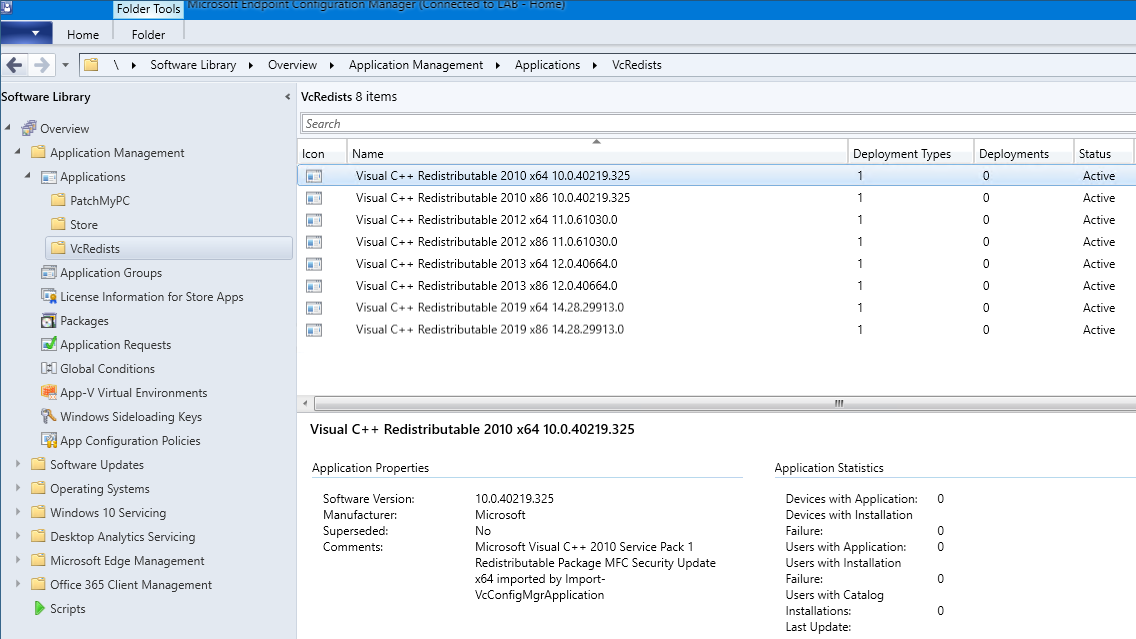
Import Redistributables into ConfigMgr
To install the Visual C++ Redistributables with Microsoft Configuration Manager, use Import-VcConfigMgrApplication to import each of the Visual C++ Redistributables as a separate application that includes the application and a single deployment type.
Visual C++ Redistributables can be filtered for release and processor architecture by Get-VcList before passing to Save-VcRedist and Import-VcConfigMgrApplication. The output from Save-VcRedist is required, because it includes the Path property that is populated with the path to each installer.
Parameters
Required parameters
VcList- An array containing details of the Visual C++ Redistributables fromSave-VcRedistCMPath- Specify a UNC path where the Visual C++ Redistributables will be distributed fromSMSSiteCode- Specify the Site Code for ConfigMgr app creation
Optional parameters
Silent- Configures the MDT application quiet install command to be completely silent instead of using the default passive install command lineAppFolder- Imports the Visual C++ Redistributables into a sub-folder. Defaults toVcRedistsPublisher- The publisher that will be assigned to the Visual C++ Redistributables application. Not required and defaults toMicrosoftKeyword- The keyword assigned to the Visual C++ Redistributables application. Not required and defaults toVisual C++ RedistributablesLanguage- The language assigned to the Visual C++ Redistributables application. Defaults toen-US
Examples
To import the Visual C++ Redistributables as applications with a single deployment type into ConfigMgr. This includes copying the downloaded installers to a network path.
$VcList = Get-VcList | Save-VcRedist -Path "C:\Temp\VcRedist"
Import-VcConfigMgrApplication -VcList $VcList -CMPath "\\server\share\VcRedist" -SMSSiteCode LAB
The install command line arguments used by default are passive. Fully silent install command line arguments can be specified with the -Silent parameter when importing the applications into Configuration Manager.
$VcList = Get-VcList | Save-VcRedist -Path "C:\Temp\VcRedist"
Import-VcConfigMgrApplication -VcList $VcList -CMPath "\\server\share\VcRedist" -SMSSiteCode LAB -Silent